📦 Containerization & Docker
📌 Overview
Containerization is an OS-level virtualization method used to deploy and run applications without launching an entire virtual machine (VM) for each app.
- Mantra: "Build once, run anywhere."
- Benefit: A container runs the exact same way on your laptop as it does in the Azure cloud.
1. Containers vs Virtual Machines
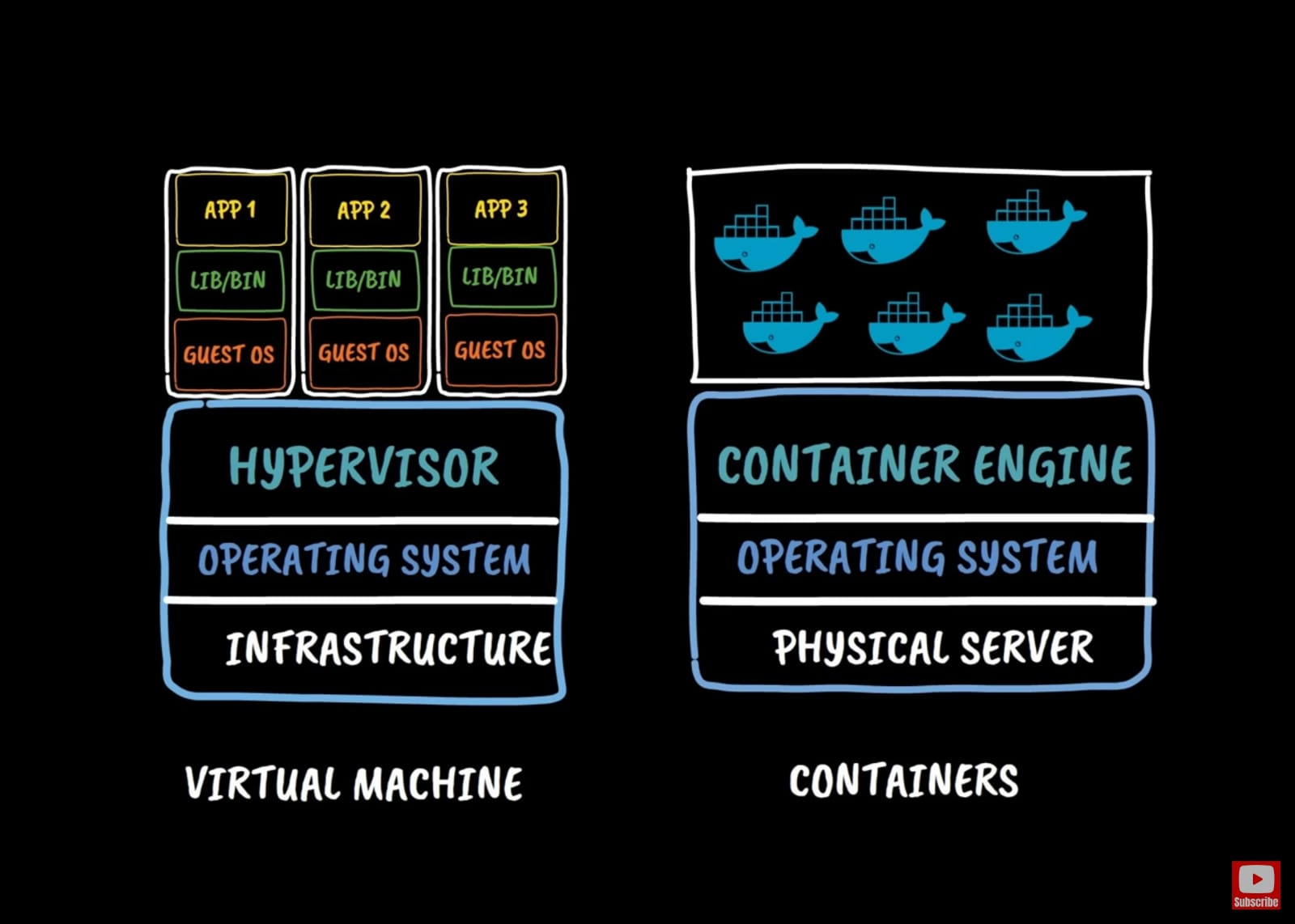
💻 Virtual Machines (Hardware Virtualization)
- Mechanism: A Hypervisor (e.g., Hyper-V) slices physical hardware into virtual hardware.
- Heavy: Each VM has its own full Operating System (Kernel), drivers, and binaries.
- Slow: Booting up a full OS takes minutes.
📦 Containers (OS Virtualization)
- Mechanism: A Container Engine (e.g., Docker) slices the Operating System resources.
- Lightweight: All containers share the single Host OS Kernel. They only package the application code and its specific dependencies.
- Fast: Starts in seconds (milliseconds often).
| Feature | Virtual Machine (VM) | Container |
|---|---|---|
| Isolation | Hardware Level (Stronger) | OS Level (Process isolation) |
| OS | Owns a full Guest OS | Shares the Host OS Kernel |
| Size | Gigabytes (GB) | Megabytes (MB) |
| Startup | Minutes | Seconds |
2. Docker Fundamentals 🐳
Docker is the most popular platform for building and running containers.
- Dockerfile: A text file with instructions on how to build the image (e.g., "Start with Node.js, copy files, run
npm install"). - Image: The read-only template built from the Dockerfile. It contains the app code + libs.
- Container: The runnable instance of an Image. You can run 10 containers from 1 image.
- Registry: A place to store and share images (like GitHub for binaries).
- Public: Docker Hub.
- Private: Azure Container Registry (ACR).
3. Orchestration (Kubernetes) ☸️
Running one container is easy (docker run). But what if you have 500 containers across 20 servers?
You need an Orchestrator to:
- Schedule: Decide which server should run the container.
- Heal: Restart a container if it crashes.
- Scale: Add more containers if traffic increases.
Kubernetes (K8s) is the industry-standard open-source orchestrator.
4. Azure Container Services
| Scenario | Azure Service |
|---|---|
| "I just want to run this one container." | Azure Container Instances (ACI) (Serverless, fastest). |
| "I need full orchestration for my complex app." | Azure Kubernetes Service (AKS) (Managed K8s cluster). |
| "I want Microservices without complexity." | Azure Container Apps (ACA) (Serverless K8s). |
| "I need a private place to store images." | Azure Container Registry (ACR). |
💡 Hinglish Explanation (Containers)
1. VM vs Container
- VM: Ek apartment building jahan har flat mein apna kitchen, bathroom, sab kuch alag hai (Has own OS).
- Container: Ek hotel room jahan kitchen aur laundry shared hai (Shares OS Kernel). Isliye yeh fast aur sasta hai.
2. Docker (The Tool)
- Hinglish: Docker woh tool hai jo aapke code ko "Container" mein pack karta hai. "Build once, run anywhere" - agar mere laptop pe chala, toh cloud pe bhi chalega.
3. Kubernetes (The Manager)
- Hinglish: Agar aapke paas 1 container hai toh aap khud sambhal loge. Par agar 1000 containers hain? Unko start karna, band karna, crash hone pe restart karna—yeh kaam Kubernetes (Orchestrator) karta hai. Yeh Container ka manager hai.
💡 Exam Tips for AZ-900
- ACI: Fastest way to run a container. No infrastructure to manage.
- AKS: For production, large-scale orchestration.
- Differentiate:
- Hypervisor = VM.
- Docker = Container.
- Kubernetes = Orchestrator.